



This website is a comparison site, offered for use free of charge and aims to offer its users informative and helpful content. We are grateful to be of service and bring you content free of charge. In order to do this, please note that when you click links and purchase items from the brands we rank on this site, we receive a commission. Your support in purchasing through these links enables us to keep providing you with content and opinion to the best of our knowledge. Such advertising fees that we may receive is not increasing your buying price and is not affecting the content we write on each product; however along with past buyers’ preference, product details and our reviewers’ findings, such advertising fees may impact the display order and scoring of a product at the website. The content on the website is provided “as-is” without warranties or guaranties and it does not constitute an encouragement or endorsement to purchase the goods that are offered for sale. We do not include or compare all products or providers in the market. See our Terms of Use and Advertising Disclosure information.
We receive advertising fees from the brands we rank below


Recommended Antivirus Software 2025: Reviews & Comparison of Top Rated Antivirus.
Defend against malware and protect your sensitive information with the best antivirus software. Compare select leading antivirus options on key features, focusing on the most important details you want to know about. Find what suits your needs with the comparison and reviews below.
We receive advertising fees from the brands we rank below. Full Advertiser Disclosure
Most recommended.
iHow We Score? Lorem ipsum dolor sit amet, consectetur adipisicing elit. Illum, maxime?
Best Antivirus 2025
TotalAV Review - Award-Winning Antivirus Protection
Best Antivirus 2025
COMPARING THE TOP 5 BEST ANTIVIRUS SOFTWARE

|
|

|

|

|
|
| Brand | TotalAV | Surfshark | Avast | iDefend | Bitdefender |
| Review | Read Review | Read Review | Read Review | Read Review | Read Review |
| Rating | 9.8 | 9.5 | 9.4 | 9.3 | 8.9 |
| iOS & Android Protection | Yes | Android | Yes | Yes | Yes |
| Real-Time Protection | Yes | Yes | Yes | Yes | Yes |
| Data Breach Monitoring | Yes | Yes | No | No | Yes (Select Plans) |
| System Cleanup | Yes | No | Yes (Select Plans) | Yes (Select Plans) | Yes (Select Plans) |
| Blocks Unsafe Sites | Yes | Yes | Yes | Yes | Yes |
| Ad Blocker | Yes | Yes | No | No | No |
| On-Demand Scans | Yes | Yes | Yes | Yes | Yes |
| Password Manager | Yes (Select Plans) | No | No | No | Yes (Select Plans) |
| Ransomware Protection | Yes | Yes | Yes | Yes | Yes |
| Money-Back Guarantee | 30 Days (Annual Plans) | 30 Days | 30 Days | 30 Days | 30 Days |
| Visit Site > | Visit Site > | Visit Site > | Visit Site > | Visit Site > |
TotalAV Ranking
TotalAV Review
Main Features
TotalAV goes beyond blocking malware with several tools included. Based on our team’s research, the main features are:
- Real-time antivirus protection
- Anti-scam, anti-ransomware
- WebShield blocks online threats
- System Tune-up Tools
- iOS and Android compatible
- Ad-blocking capabilities
- VPN for private Browse (except Premium plan)
- 30-day money-back guarantee
- Award winning Antivirus

Visit Site
Review of TotalAV Compatibility and System Requirements
TotalAV has excellent compatibility. Its security plans are available on Windows, macOS, Android, and iOS. The system requirements are:
- Windows Vista (v6) 10 and newer
- Windows 2000 (v5) 7 and newer
- macOS 10.9 and newer
- macOS High Sierra (v5.10) 10.9 and newer
- Android 5 and newer
- iOS 8 and newer
We like that TotalAV is compatible with older versions of Windows and macOS. That allows those with with older laptops or budget desktops can get modern protection without requiring a hardware upgrade. Requirements for minimum memory, CPU, and disk space for each system are listed on the TotalAV website.
Browser compatibility is great too. For example, on Windows 10 or higher, TotalAV supports Chrome, Firefox, Microsoft Edge, and Opera GX.
3 Plan Options: Premium, Internet Security, or Total Security
TotalAV has three paid plans, so you can choose which antivirus solution meets your needs the best. All three have low introductory pricing.
Premium
This entry-level plan includes three devices. It has the lowest first-year price of the paid options. That includes real-time antivirus, ransomware, and phishing protection, as well as tune-up tools, including a disk cleaner, and WebShield browser protection. It will suit many individuals and couples looking for protection and optimization without the need for extras like a VPN, password manager, or full-feature ad blocker.
Internet Security
Get double the number of devices included with TotalAV’s Internet Security plan. Along with the six devices, this plan includes all the Premium features plus a Safe Browse VPN for online privacy and security. This option may suit families who want full device protection plus VPN. It’s roughly twice the Premium cost for the first year, but less than the Total Security plan, and still what we consider reasonable.
Total Security
Get eight devices in this top-tier plan that is value-packed with all the Internet Security features, plus Password Vault (a password manager) and Total Adblock (an advanced ad-blocking extension). All for only a slightly higher first-year fee than Internet Security. Multi-device households, those who want an antivirus, VPN, password manager, and ad blocker in one dashboard, and users looking for maximum privacy are likely to prefer this plan.
CHECK PRICE PLANS
There is also a free plan. It is a decent entry point for occasional virus scans, but for real-time protection, phishing protection, anti-ransomware, and additional valuable features like a VPN, the paid tiers are more likely to suit a lot of people.
TotalAV Review: Pros and Any Limitations
Getting a clear picture of what to expect from TotalAV can help you determine how it fits your online activities, needs, and preferences.
High Malware Detection Scores in Tests
TotalAV’s antivirus protection has received several respected awards, including Top Product. It has also been awarded for its high malware detection scores, including the VB100 A+ rating. That award reflects TotalAV’s excellent reliability in detecting virus samples in tests done by Virus Bulletin, a respected body. Accolades like this indicate strong performance and reliability.
Real-Time Protection
The real-time protection includes scanning files as they are downloaded, detecting and blocking suspicious activities, and scheduled scans. This is more signature-based protection than behavior-based, which means it can only detect malware that is in TotalAV’s database of known threats. So, you may want a dedicated privacy or security app alongside the antivirus if the latter’s more advanced analysis is important to you.
Scheduled Scans
Set up automatic scans to happen at set intervals to identify potential issues like malware, which helps keep your system at its best without needing to manually intervene. Also, TotalAV for mobile devices (Android and iOS) have App Lock to secure apps with a fingerprint or PIN to increase privacy and security.
Multiple Types of Devices
TotalAV can help users manage many different devices across platforms: Windows, macOS, Android, and iOS. That appeals to those who need protection while traveling, in addition to a desktop computer. Plus, it’s usable on three, six, or eight devices, depending on the paid plan choice.
Does TotalAV sound like a good fit for you? See what else buyers have to say.
Anti-Phishing and Anti-Fraud
Included in all three TotalAV paid plans, WebShield is a real-time browser feature blocking access to dangerous websites before they load. Its ability to block phishing, fraud, and malware-hosting domains will be valuable to many people, such as those who aren’t always sure which sites are fake, online shoppers, and remote workers. While it’s not a complete replacement for a browser security extension, WebShield increases the safety level when Browse or shopping online.
Speed
A standout quality of this antivirus is its lightweight nature. Background processes are designed to run without using excess resources. Quick scans do not take long, and some users online note that there is little system impact. This feature is often important to those who want to secure their devices without reducing performance.
System Tune-Up Tools
Several included tune-up tools are designed to improve device performance by optimizing start-up processes, cleaning up unnecessary files, and more. That helps keep devices clean without needing in-depth technical knowledge. Gamers may appreciate the ability to maximize their system’s performance, while those with older PCs could get a bit longer lifespan from their machines.
Ease of Use
TotalAV has an intuitive interface that has been described online as being beginner-friendly. The dashboard has a clean look and modern design, with an onboarding process after signup to explain the main features.
Firewall
A firewall is not an included feature. Instead, TotalAV’s focus is on malware detection and removal, with real-time protection and other valuable features. While it does not have a full firewall, the WebShield blocks access to known malicious sites.
Customer Service
There are many support options:
- Live Chat
- Phone
Some users online have reported occasional delays in non-urgent problems. That indicates urgent issues are best dealt with via live chat or phone. There are also useful FAQs, guides, and troubleshooting articles on TotalAV’s site.
Money-Back Guarantee
TotalAV has a money-back guarantee, in the rare case that you are not fully satisfied, showing confidence in its quality. That allows you to request a full refund of the Premium, Internet Security, or Total Security plan within 30 days of starting or renewing an annual or biannual subscription, or within 14 days of starting or renewing a quarterly or monthly plan. The refund is based on the policy terms posted on the TotalAV site.

Visit TOTALAV
What about Privacy Tools? VPN, Ad Blocking & Password Manager
Features like a VPN, ad blocker, and password manager may also be important to you. TotalAV offers them in certain plans, maximizing the utility of the antivirus. Three examples are:
Safe Browse VPN - Included in the Internet Security and Total Security plans, it encrypts your internet connection using AES-256 bit encryption, a top standard security-wise. It will be useful for those who want to hide their IP address, browse securely on public Wi-Fi, and access geo-restricted content.
Total Adblock - This ad-blocking browser extension, included in the Total Security plan, blocks pop-up ads, banner ads, and video ads, as well as third-party trackers and malicious ad links. If ads annoy you or you worry about tracking cookies, this feature is likely attractive.
Password Vault – This Total Security plan feature securely stores and encrypts passwords and logins behind a single master password. A single vault makes remembering passwords for several accounts easier and is made to be user-friendly.
TotalAV Review Conclusion
TotalAV is an antivirus suite with plan options to meet different needs, based on the number of devices, budget, and more. We like that it offers security without needing in-depth tech know-how.
While traditional app monitoring and a full firewall are absent, TotalAV does have a lot to offer. Main features like WebShield, real-time protection, and system tune-up tools offer protection and performance benefits. Depending on the plan chosen, useful extras like a VPN, ad blocker, and password manager are available at a low introductory price. It offers terrific value for use across multiple devices.
Based on our research, TotalAV is a popular, comprehensive antivirus solution with ease of use that appeals to those who want security and privacy tools in one package.
Visit Official Site
Super AntiSpyware Ranking
Super AntiSpyware
Super AntiSpyware: Main Features
Our team’s research highlights these as the key features:
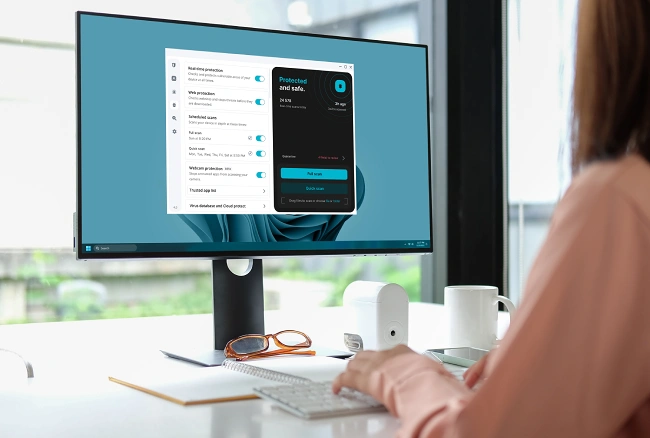
- Real-time antivirus with Cloud Predict
- Web Protection actively blocks threats
- Customize scheduled scans
- Lightweight security
- Webcam protection
- Database updates for new viruses
- 30-day money-back guarantee (in bundle)
Super AntiSpyware is not a standalone service. Instead, you must subscribe to a Surfshark One or Surfshark One+ bundle to access it. That gives you access to protection features alongside the antivirus software.
Visit
Super AntiSpyware Compatibility and System Requirements
Super AntiSpyware supports a range of operating systesms: Windows, macOS, and Android. It is lightweight in design, meaning that adding the security software is less likely to slow down the device’s performance. The antivirus can run on both older and new systems, as follows:
- Windows 10 (64-bit) and newer
- macOS Big Sur 11 and newer
- Android 5 and newer
It is important to note that this antivirus is not compatible with Windows ARM or Android devices that aren’t 64-bit. Surfshark’s antivirus isn’t on iOS, however, the Surfshark One and Surfshark One+ bundles include a VPN and other features for extra online protection.
Reviewing Super AntiSpyware: Pros and any Drawbacks
Certain features will be more important to you than to other people, so it’s important to find out if Super AntiSpyware offers what you’re looking for. Here are the pros and potential limitations.
Real-Time Protection
The antivirus runs continually in the background, scanning files and apps as you interact with them, from accessing USB drives to opening external media, modifying files, and downloading documents. That makes the software effective at stopping threats from infecting your devices, which could slow them down, make your personal info vulnerable to attackers, and cause other issues.
Detects Malware Better
Super AntiSpyware uses Cloud Predict, an AI (artificial intelligence) prediction system built on a global threat database, built on data from millions of devices. The cloud-based approach allows the software to spot brand-new (zero-day) threats and new malware faster than a signature database may be able to. Knowing that the software proactively blocks suspicious activity efficiently can bring more peace of mind to users.
Also, Surfshark updates its malware database every three hours to keep you protected from the newest threats. There’s no worry that the antivirus software is relying on an outdated database that could compromise your security.
In addition, Super AntiSpyware uses heuristic scans to detect and prevent malware that hasn’t yet been identified. That’s great for combating zero-day threats. Enjoy anti-tamper protection too, meaning your antivirus can’t be turned off by anyone you haven’t authorized or by malware. Finally, the antivirus does boot sector scans to detect any viruses that execute before your operating system loads, catching threats early on.
Does Super AntiSpyware sound like a good fit for you? See what else buyers have to say.
Powerful scanning and removal tools
Independent testing of Super AntiSpyware recognizes its value. AV-TEST, a top testing company in this industry, certified the protection of this antivirus. It scored a 5.5/6 in Performance and a perfect 6/6 in both Protection and Usability. That shows its effectiveness in detecting threats, being user-friendly, and lightweight in design.
Web Protection Feature
A valuable Web Protection feature is part of Super AntiSpyware. It actively runs in the background, helping protect against malware and phishing sites that could steal your data or invade your privacy. This optional feature is only available on Microsoft Windows.
Filtering out phishing attempts, scam URLs, malicious trackers, and sites with malware from entering your devices is easier, as Web Protection automatically blocks any malicious link or software it detects. You can even exclude specific sites from being blocked on your Exclusions list.
No Firewall
There is no integrated firewall with the antivirus. Instead, it relies on the VPN included with both Surfshark One and Surfshark One+ bundles for network security, as well as using your operating system’s built-in firewall to protect against network traffic. This next feature may be more important to you.
Webcam Protection
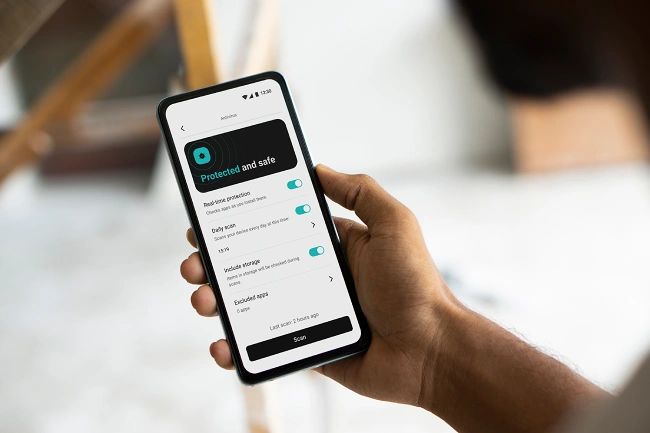
A unique feature is the Webcam Protection. That helps your webcam avoid unauthorized access by blocking apps that attempt to use it without your permission. Active monitoring of attempts to access your webcam keeps you feeling safer. If an app is not on your approved list, which you can easily create within Surfshark Antivirus, you will receive a notification. At that point, you can decide whether to block it or add it to your approved list.
Visit Site
Number of Devices
Up to five devices per account can run Super AntiSpyware at the same time, which includes desktop and mobile. Some users note online that this number is reasonable, although it may not be enough for multiple family members who each have phones, laptops, and perhaps tablets too. For those who use this antivirus, there is a lot to be said for its cross-platform coverage across Windows, macOS, and Android under one subscription.
Scheduled and Manual Scans
Customize the scheduled scan settings to do them the way you want, whether it’s a quick or full scan. Also, choose how often you want the scans to happen, based on what works with your schedule. You can also do a manual scan when you decide to, keeping you in control so your device is in the best condition possible.
Speed and Additional Features
Many users online describe the scan speed positively. Several also note that there is not a significant impact on system performance when doing these scans. A big reason for that is that the Super AntiSpyware app is bloat-free for a better experience using it and low CPU (Central Processing Unit) consumption.
Quick scans generally take a few minutes, while in-depth scans can take longer. Some users online note that the long scans are slower than expected. To shorten scan time, you might scan only certain files or folders.
Ease of Use
Super AntiSpyware has a clean look and straightforward navigation. The optional Web Protection feature is easy to toggle on and off in your dashboard, and customizable scan settings are simple to set the way you want. That makes it useful for those who do not have advanced tech knowledge. There is also a built-in feature to auto-delete quarantined files, so you don’t have to stress out about doing it. Infected files are removed after 60 days for you.
Pricing and Plans
Regular discounts on the initial subscription period can help users save money. Both Surfshark One and Surfshark One+ bundles include the Surfshark Antivirus and are competitively priced for the first year. When promotions end, pricing increases. Still, users can get great value from the number of security features in either bundle, more so than a standalone antivirus program.
The Surfshark One bundle includes Super AntiSpyware, a VPN for encrypted Browse, a private search engine feature, Alternative ID, and Alert. Alternative ID consists of a masked email generator and personal detail generator, while Alert is an around-the-clock data leak monitoring tool that alerts you if your data is leaked online. This bundle is likely best for general users wanking online privacy and antivirus in one convenient package.
Surfshark One+ is the more comprehensive plan of the two options, so it is slightly higher priced. It includes everything in Surfshark One, including Surfshark Antivirus, as well as a service called Incogni. For US, UK, EU, Swiss, and Canadian residents, Incogni is a personal data deletion tool to help protect your privacy. Surfshark One+ is likely best for individuals and families who prioritize privacy and want more control in this area.
CHECK PRICE PLANS
30-Day Money-Back Guarantee
After signing up for a Surfshark plan that includes the antivirus, a 30-day money-back guarantee gives you time to decide if it’s right for you. In the unlikely event that you decide within 30 days of purchasing the subscription that you no longer want it, contact support through Live Chat to begin the refund process, provided you meet the company’s terms posted on its website.
AMSI and Behavioral Scans
An anti-malware scan interface (AMSI) and behavioral scans are also noteworthy Super AntiSpyware features. The AMSI on Windows systems improves the ability of the antivirus to detect and block threats, such as malicious scripts and files that might otherwise get missed by signature-based protection.
As for the behavioral scans, available solely on Windows OS, this feature provides advanced protection by monitoring unusual app and file activity. That includes identifying new threats and alerting you to them, even when the malicious code wasn’t already known.
Customer Service
If you have issues using the antivirus in your subscription, it’s nice to know that Surfshark offers 24/7 customer support. There are live chat and email options, depending on what you like best. The around-the-clock service means you can ask a question when it’s convenient with your schedule, even in the middle of the night.
Conclusion: Super AntiSpyware Review
For those looking for a well-rounded, lightweight, and user-friendly antivirus solution, this one from Surfshark may be the right choice. It has real-time scanning, an AI-based predictive protection module, scheduled and manual scans, and optional Web Protection.
Enjoy protection for your webcam, too. While there is no dedicated firewall and the five-device limit may limit some people, Super AntiSpyware makes up for it, in our opinion, with strong malware detection, anti-tamper controls, and behavioral scanning.
Also, there is a 30-day money-back guarantee for the bundle it is included in, a package that offers valuable extras in addition to antivirus, such as a VPN. We recommend Super AntiSpyware for its many useful features, in addition to being part of a larger bundle for added protective features.
Visit Official Site
Avast Antivirus Ranking
Avast Antivirus Review
Top Features
Avast Premium Security offers advanced protection with:
- Award-winning virus protection
- AI-powered Avast Assistance for real-time guidance against scams
- Includes advanced firewall
- Email and online scam protection
- Stop unauthorized PC remote access and webcam hackers
- Lower app security risks
- Upgrade to Ultimate for VPN, cleaning, and anti-tracking
- 30-day money-back guarantee
About Avast
Avast is widely respected online for its cybersecurity tools. We appreciate the selection of standalone products and bundles for security, privacy, and performance. Choosing a well-known provider to protect your desktop and mobile devices can increase confidence in the reliability of your security, the strength of threat protection, and the quality of customer service.

Visit Site
Free Avast Antivirus: Review of Protection
The free Avast Antivirus for a single device has online security features, malware protection, and Wi-Fi network scanning. The software has millions of downloads, per Avast’s site, and several notable awards, including Top Rated Product from the independent testing lab AV-Comparatives. That speaks highly to Avast’s reliability, user-friendly protection, and performance.
Avast’s Premium Security Antivirus includes that award-winning protection and builds on it with advanced features. While the free version is competent, Premium Security goes beyond the basics to better protect your privacy and personal data, including helping you avoid online scams. The premium version is also available on multiple devices, unlike the free one. Let’s compare them further.
Free Antivirus vs Premium Security
While both are compatible with the same operating systems, they vary in the number of devices and the extent of protection.
OS Compatibility
Both the Avast Antivirus versions – the free one and the Premium Security Antivirus – are compatible with the major operating systems:
- Windows PC
- macOS
- Android
- iOS (iPhone/iPad)
The minimum system requirements for each one are clearly laid out on the Avast site. Being available on several platforms makes the applications usable by more people.
Number of Devices
A clear distinction between these two Avast Antivirus versions is the number of devices that they are usable on:
- Free Avast Antivirus – Limited to single device installations.
While you can download individually onto each device and activate the license separately each time, there is no central management or multi-device license. You must maintain each device independently.
- Avast Premium Security Antivirus – Choose the option for your needs. There is a plan for one device and a plan for up to 10 devices (across Windows, macOS, Android, and iOS).
A multi-device plan suits those who have more than one device or families to protect all devices with one license, so none of them are exposed. With central management in your account dashboard, ensure that protection is consistent across your devices.
While the free version has utility, you may look for a more cohesive security and privacy bundle. With that in mind, let’s discuss the additional features of Avast Premium Security.
CHECK PRICE PLANS
Avast Premium Security Antivirus Review: Pros and Any Limitations
With the Avast Antivirus called Premium Security, you get everything the free antivirus offers, plus more robust security features and seamless use across several devices.
Going beyond basics might be right for you if you want antivirus protection across more than one device and protection against more complex threats, as well as features like protecting your webcam. If so, Avast Premium Security provides those more advanced qualities. Understanding the benefits and potential limitations helps you decide if it suits you.
Real-Time Malware Protection
The software continually scans files and apps for spyware, viruses, and other threats for real-time protection. That provides ongoing security, beyond scheduled scans. The real-time shields include:
- Web Guard – Monitors online traffic to block dangerous websites and downloads.
- Email Shield – Scans emails for dangerous attachments and links.
- Behavior Shield – If any apps start to behave suspiciously, you receive an alert so you can act immediately.
- File Shield – If you download an attachment, the real-time File Shield scans it immediately. If it is malicious, Avast blocks or quarantines it before it runs.
- Remote Access Shield – Control which IP addresses are allowed to connect to your device and block all other connection attempts. That reduces brute-force attacks and connections from high-risk IP addresses.
Wi-Fi Network Security
The Avast Premium Security Antivirus has Wi-Fi network security for a safer connection. Network Inspector identifies security issues in your home network and detects if an unknown device is connected, alerting you in case of a possible intruder. The sophisticated software tells you if there are weaknesses in your router, such as outdated firmware or insecure settings, and checks for unsafe network connections. A weak Wi-Fi encryption or public networks could leave you vulnerable to eavesdropping, so Premium Security tells you if these issues are detected.
Scam Protection
An Avast Assistant uses AI to help you identify online scams and suspicious emails. The software uses AI to analyze potential scams in emails, messages, or websites, and explains in clear language why something might be unsafe. The assistant then suggests practical next steps, such as not clicking a certain link. We like that this feature goes beyond just flagging scams to also explaining them to you for a better understanding. That is especially useful for those who are not tech-savvy. You will also get alerts of compromised passwords, ransomware protection, and shields to block malicious sites and unsafe email downloads.
Advanced Firewall
Although a firewall is included in the Avast Free Antivirus, it lacks the extra protection of the Premium Security software. Get a stronger firewall with port scan alerts and ARP spoofing protection, for example. These tools are vital for more complex network attacks and data leak risks.
Webcam Protection
Prevent unauthorized access to your webcam with Webcam Shield. This feature prevents deceptive apps and malware from taking photos and videos on your webcam, which could invade your privacy.
Does the Avast Premium Security Antivirus sound like a good fit for you? See what else buyers have to say.
Enhanced Email and Phishing Protection
Email Guard scans your web-based email account continuously and alerts you to suspicious emails to prevent you from opening or clicking on malware or phishing scams.
Real Site is another useful feature of Avast Premium Security Antivirus to protect against DNS (Domain Name System) hijacking. It secures you against malicious programs that steer you from a real site to an inauthentic one to steal your info, such as login passwords and credit card info.
Sandbox
Being able to browse online or run an app in a safe environment is important so this virtualization tool is handy to have. That way, your device is not at risk if you want to run suspicious apps.
Several Devices
As we’ve discussed, you’re able to add the Avast Premium Security Antivirus to multiple devices. Choosing a plan with up to 10 devices on one license means you’re able to cover devices for the whole household or all of yours, if you have several. That will suit many families, especially given Avast’s cross-platform support.
Data Shredder
You may want to erase files or even entire drives without the ability to restore them, eliminating the risk of anyone mishandling your data. The Data Shredder feature enables you to do so. It can be especially handy when selling or donating your computer, for example.
Online Banking Protection
Protection when accessing your banking website or making a payment online is crucial, so Bank Mode is great to have. This virtual desktop feature helps prevent malicious scripts and other ill-intended actions from third-party apps to protect your sensitive details.

Visit Avast
Customer Service
User reviews online are mixed for customer service. While some say online that Avast is excellent for online chat and phone support, others describe long wait times. We like that there are a variety of ways to reach out to the Avast team or troubleshoot an issue yourself:
- Phone
- Online chat
- Support Center articles (Avast site)
AI-Powered
Get real-time, active protection with Avast’s AI-powered threat detection technology. This advanced tech continually checks applications and processes in your system (behavioral analysis) to flag malware. Rather than relying on known virus signatures, Avast’s AI predicts whether a file or action is malicious, so zero-day threats (malware that is totally new) are often caught before they can hurt your system.
User Friendly
Avast Premium Security Antivirus automatically downloads and installs updates for ease of use. The other included Avast apps (VPN, cleanup software, and anti-tracking tool) are set by default to automatically update, too. You can also manually update each one, if you prefer.
The dashboard is intuitive, with a clean look. That makes it easier to manage the settings, reducing complexity even if you don’t have a lot of tech knowledge. Also simplifying use is the multi-device plan, as it protects up to 10 devices of different operating systems on a single subscription for easier management.
30-Day Money-Back Guarantee
Being able to try the bundle or get your money back, if not totally satisfied, within 30 days of purchasing the Avast Premium Security Antivirus, is valuable. This 30-day money-back guarantee gives you time to make sure it’s right for you and, in the rare case you are not totally satisfied, get a full refund, based on Avast’s policy guidelines. Reading the policy on the Avast site can help you understand refund eligibility and related details.
If You Want a VPN, Anti-Tracker, and Cleaning
Avast Premium Security Antivirus protects against online threats, as we’ve discussed, to keep your covered devices safer. If you also want a VPN, consider upgrading to another Avast plan, the Ultimate bundle. The VPN encrypts your internet connection with robust AES-256, protecting your privacy at home and even on unsecured public Wi-Fi, as well as preventing data interception and eavesdropping. It is also useful for streaming TV shows, movies, and sports content, and torrenting privately and more securely.
The Ultimate suite also includes anti-tracking software that blocks online trackers, disguises your online footprint, and keeps your anonymity while online. That reduces the chances of identity theft and profiling. A cleaning tool called Avast Cleanup Premium comes in the bundle, too. By removing junk files and unneeded files, your system is better able to perform well.
Avast Antivirus Review Conclusion
Based on our team’s research and review, Avast Premium Security features a highly respected antivirus with several shields of protection. The reasonably-priced plans are usable across Windows, Mac, iOS, and Android.
The multi-device support will meet the needs of many families and individuals with up to 10 devices. Those who use it are likely to appreciate webcam protection, Bank Mode, and data shredding features. With a user-friendly design and a 30-day money-back guarantee, we consider the Avast Premium Security Antivirus to be high-value.
Visit Official Site
iDefend Antivirus Ranking
iDefend Identity Pro
Main Features
A list of features shows you at a glance what makes this software stand out. Our team agrees that the key features of iDefend Antivirus are:
- Award-winning antivirus technology
- iDefend Internet Security for advanced protection, including enhanced firewall and Wi-Fi security
- iDefend Ultimate for antivirus, VPN, anti-tracking, and cleaning software
- Multi-platform support
- Up to 10 devices
- 30-day money-back guarantee
Visit iDefend
About iDefend
iDefend offers a variety of internet security, privacy, and performance tools for desktop and mobile devices. iDefend has over 25,000 reviews on Trustpilot, with an average 4.5-star rating. Trustpilot is a respected platform for user reviews. It can be reassuring to know that so many users have had positive experiences with this company, with the reviews pertaining to customer service and the products themselves. This review focuses on its antivirus software options to help you make a more informed decision.
Wide Operating System Compatibility
iDefend Antivirus, whether you choose the free version or a premium plan, is usable on the major platforms:
- Windows PC
- Mac
- Android
- iOS
iDefend’s site clearly states the minimum system requirements for each operating system. The cross-platform support means this antivirus software can protect a range of devices.
Review of iDefend Antivirus Choices: Free vs iDefend Internet Security
When comparing iDefend Antivirus options, the main differences are the range of features, protection levels, and number of devices. While the free antivirus is capable, it has limitations that the premium iDefend Internet Security can overcome, including webcam security and email security, and support for multiple devices.
Free iDefend Antivirus
We appreciate that iDefend offers a free antivirus for basic real-time protection against viruses, spyware, and other malware types. It is an award-winner with real-time scanning and basic detection against malware, phishing, and ransomware. It has an easy-to-use design, is simple to download, and is lightweight, meaning it is less likely to slow performance during use.
iDefend Internet Security Antivirus
While the free version can meet essential needs, those who need comprehensive security and protection stand to benefit from upgrading to iDefend’s Internet Security antivirus. It includes all the features of the free version plus several advanced features for more protection.
This software has multiple layers of protection and the world’s biggest threat-detection network, per iDefend’s site, to block threats, even if they are more complex or new. There are also plans for single desktop or multi-device; the latter allows for up to 10 devices per license, meeting the needs of many households.
iDefend Internet Security antivirus is more likely to suit the needs of those who want multi-device coverage, more security when shopping or banking online, and making online payments. A high level of protection against unauthorized access can also be important for those who work from home.
iDefend Antivirus Plans and Pricing Review
There are different iDefend Internet Security antivirus plans to meet various user needs, from individuals wanting more protection to families and businesses needing cohesive security. There is a single-device subscription, covering one PC or one Mac.
Alternatively, there is a multi-device subscription, supporting up to 10 devices across Windows, Mac, Android, and iOS. Being able to activate it on multiple devices and transfer the subscription between platforms allows seamless security. Many families who want to protect all their devices easily will prefer this option, as will individuals who have several devices to protect.
iDefend’s Internet Security plan pricing is competitive, especially for the first year. There are regularly discounts through the iDefend site to save users money, without sacrificing quality.
CHECK PRICE PLANS
iDefend Identity Pro: Pros and Any Limitations
Is the iDefend Antivirus called Internet Security right for you? Let’s look at the benefits and potential drawbacks of its features to help you decide.
Real-Time Malware Protection
The sophisticated software detects, blocks, and removes malicious software using real-time scanning, so your computer and sensitive data are not left vulnerable. That includes adware, viruses, ransomware, spyware, trojans, and phishing links. The software can detect unsafe sites or email links to prevent them from stealing your info.
This iDefend Antivirus is AI-powered. It uses advanced algorithms to identify malware, even if it hasn’t been seen before. By identifying habits and behavior, rather than relying on known virus signatures, the AI monitors how programs behave to identify suspicious activity and trigger alerts or automatic blocking.
Anti-Ransomware
Get protection against ransomware, as iDefend’s Internet Security antivirus monitors and blocks file changes that you have not authorized. That can prevent you from getting locked out of files or the entire system and receiving a ransom demand from the attacker to give you access again. That helps you avoid significant threats to your data, finances, and privacy.
Enhanced Firewall
Get superior firewall protection as iDefend Internet Security monitors traffic (both incoming and outgoing) to block unauthorized users from entering your network. That helps prevent hackers and malware from accessing your computer. A feature we particularly like is the Wi-Fi security alerts that detect unsafe networks and warn you if a Wi-Fi connection could put your device at risk.
Having a second layer of security beyond antivirus scanning can help you feel more at ease, especially when using public Wi-Fi. It is designed to be easy to use, whether you want automatic protection or prefer to set custom rules.
Does the iDefend Internet Security Antivirus sound like a good fit for you? See what else buyers have to say.
Award-Winner with Strong Independent Test Scores
iDefend’s antivirus technology has won several awards, including those from reputable third-party testing labs AV-TEST and AV-Comparatives. Positive results from these tests include user confidence in iDefend antivirus options for protection and speed.
For example, the free iDefend antivirus has won the AV-Comparatives Top-Rated Product award. This award comes from showing high-level performance across real-world threats and malware in tests, and its minimal impact on device performance.
iDefend Internet Security antivirus recently won AV-Comparatives Advanced Threat Protection Test award. The award recognizes how the antivirus software defended against real-world ransomware and information-stealer attacks on Windows 10 and 11 in live testing scenarios.
iDefend antivirus software has won multiple awards from AV-TEST in testing environments. That includes the MacOS Home User Protection Test certification for defending against malware infections without significantly impacting performance.
Multiple Devices, 1 License
A single license for a multi-device iDefend Internet Security antivirus plan can cover up to 10 devices. You don’t need separate subscriptions for each license, simplifying management of your devices. Protecting them is easier, whether you have multiple devices or the license applies to different people in your household. In families and homes where there are a mix of Windows PCs, Macs, and mobile devices, being able to cover everyone is a major benefit. Alternatively, you can choose a single-device plan if you only have one device to cover.
Ease of Use
Our team found the general consensus online is that the iDefend Antivirus called Internet Security is easy to use. It has an intuitive dashboard with straightforward settings. That helps make for a more positive experience, especially when using the antivirus on different devices.
Some users online say the popups that appear on the free version of iDefend Antivirus are distracting. That may prompt you to upgrade to a plan instead. While there are a few users online who say they have had issues with installing the antivirus software, it is not common, based on our research.
Visit Site
Webcam Protection
While there is not an included password manager, iDefend Internet Security does provide webcam protection, which some users may consider more important. This feature prevents hackers or malware from taking control of your webcam without your knowing, which could leak sensitive info or watch your activity. There are different modes to control your privacy, such as smart mode and block access, for the functionality you prefer.
Verify Network Security
iDefend’s Network Inspector scans Wi-Fi networks for insecurities and alerts you to them, such as outdated routers and unencrypted traffic. That way, you know when a connection is unsafe and prevents hackers from taking advantage of network vulnerabilities. This feature is available in iDefend Antivirus called Internet Security, but not the free version.
Protection from Fake or Unsafe Sites
The Fake Website Shield in the iDefend Internet Security antivirus protects against DNS hijacking. That way, you get to the real site, instead of being diverted to a fake one that could take your password and payment details without your knowing. That gives you assurance that the displayed site is authentic rather than a phishing site.
This same shield protects against sites with malware, suspicious downloads, or unsafe scripts, too. It blocks access to unsafe sites to prevent your device from getting infected or your privacy being invaded.
More to Know: iDefend Antivirus Review
Customer Service
Users online are generally positive when describing iDefend’s customer service. For example, some users say its service team is professional and helpful.
As a subscriber to iDefend Internet Security antivirus, you have many ways to contact customer service. Choose the one you’re most comfortable using:
- Online chat
- Phone
- Support articles
- Community forums
30-Day Money-Back Guarantee
iDefend Internet Security plans include a 30-day money-back guarantee, with a full refund for those who meet eligibility requirements. That gives you time to try the software to determine if it meets your needs for usability, performance, and protection for up to 30 days from the purchase date, risk-free. That gives you greater peace of mind and shows iDefend stands behind its software.
For Those Wanting a VPN
While iDefend’s Internet Security antivirus does not include a VPN, you can purchase the iDefend Secure VPN separately. Alternatively, you can upgrade to the Ultimate bundle for an all-in-one that includes VPN, multi-device antivirus, cleanup tool, and anti-tracking software. Thus, a VPN is available with select iDefend plans in combination with antivirus.
Conclusion: iDefend Antivirus Review
iDefend Antivirus offers a flexible range of options to protect your devices and personal data, whether you choose the free single-device antivirus or upgrade to iDefend Internet Security for advanced security and protection. The latter is available in affordable single-device and multi-device plans, depending on your personal and household needs.
With wide compatibility across Windows, Mac, Android, and iOS, iDefend Internet Security antivirus provides award-winning malware protection, enhanced firewall, and easy-to-use design. Features for network and webcam security, independent test awards, and a money-back guarantee add significant value.
Based on our research, we consider iDefend Antivirus, specifically the Internet Security options, to be a reliable and user-friendly choice for those looking for advanced security.
Visit Official Site
Bitdefender Ranking
Bitdefender Antivirus Plus Review
Main Features
We found the following main features, based on our research into Bitdefender Antivirus Plus. Not all features are available for every platform.
- Real-time data protection
- Ransomware protection
- High-speed security scans
- VPN encryption
- Malware detection and removal
- 30-day money-back guarantee

Visit Bitdefender
Bitdefender Antivirus Plus Protection
From viruses to ransomware, Bitdefender offers a broad range of data protection features. Read on to learn what's available for your devices.
Windows
Bitdefender protects data from a wide range of external threats, including viruses, worms, Trojans, ransomware and spyware. It monitors and identifies network-level and app-level threats and blocks malware and other malicious third-party attacks. Security scans detect outdated software and security holes and recommend steps to repair vulnerabilities. From anti-fishing and anti-fraud protection to clean-up and restoration, Bitdefender offers comprehensive Windows protection.
macOS
macOS protection includes encrypting files to provide robust protection against ransomware and other types of malware. Bitdefender's Traffic Light browser extension protects against harmful content and unsafe web pages. To make things easier, you can switch on the Bitdefender Shield to automatically detect and remove threats. Other macOS protections include adware blocker and anti-phishing features, as well as cross-platform malware detection to prevent sending files that are harmful to Windows.
iOS and Android
Bitdefender Antivirus Plus protects iOS and Android devices, too. Its Android protection includes an industry first: App Anomaly Detector to protect against new threats as they evolve. You can use WearOn to extend protection to your smart watch and anti-theft protection to locate or wipe a missing device. Bitdefender offers scam protection to both Android and iOS. Other iOS protections include web protection and security scans.
Does Bitdefender Antivirus Plus sound like a good fit for you? See what else buyers have to say.
Bitdefender Antivirus Plus Performance
Protection is crucial, but what about speed? We share what our team learned about Bitdefender and device speeds.
Windows
For Windows, Autopilot provides ongoing advice about security actions based on your system and usage. Bitdefender Photon helps improve speed and performance for your specific system configurations. Bitdefender even knows when you're in game, movie, or work mode and will pause unnecessary operations to maximize speed.
macOS
Autopilot is also a feature for macOS computers, keeping you informed on recommended actions for your specific needs. According to the company website, Bitdefender offers high-speed scans with the best detection rate in the industry. To prevent unnecessary slowdowns, 24/7 Cloud-Based Guard Duty does much of its work in the cloud.
iOS and Android
Although the Bitdefender website does not mention specific iOS performance features, it does provide Autopilot recommendations for Android devices. It scans with lightning-fast speed and does most of its work in the cloud, minimizing effects on Android performance.
Bitdefender Antivirus Plus Privacy
Internet activity can make your personal data vulnerable to unwanted third parties. In the following sections, we look at encryption and other privacy protections offered by Bitdefender.
Windows
Bitdefender VPN provides encryption for all internet traffic and 200MB of encryption for all Windows devices. It blocks third-party trackers from accessing your data and even helps speed up web page loading. Want to remove a file and any trace that it existed? The File Shredder feature does that job. Bitdefender also offers specific protection for your social media and online banking, and can test your Wi-Fi and router security.
macOS
For macOS, Bitdefender Antivirus Plus offers VPN encryption services to keep your internet activity private. It also provides the Anti-tracker extension to protect your Browse privacy and increase the speed of web page loading.
iOS and Android
Bitdefender for iOS includes VPN privacy protection. It also provides email account protection, which scans emails for privacy breaches and prompts you to change passwords when warranted. Android privacy protections include VPN encryption, as well as App Lock, which protects apps with PIN codes, and privacy protections for your online accounts.

Visit Site
System Requirements for Bitdefender Antivirus Plus
Check the information below to find out if your device meets the system requirements for Bitdefender Antivirus Plus.
Windows
Bitdefender Antivirus Plus requires Windows 7 with Service Pack 1, as well as Windows 8.1, 10, and 11. You'll need 2 GB of memory (RAM) and 2.5 GB of free hard disk space. Internet Explorer 11 software is required.
macOS
For macOS computers, Bitdefender will work with macOS X Yosemite 10.10 or later. It requires 1 GB of free space and supports Safari, Firefox, and Google Chrome. Bitdefender VPN will only work on macOS Sierra 10.12 or later.
iOS and Android
You will need iOS 11.2 or later and an active internet connection for Bitdefender Antivirus Plus. For Android devices, Android 5.0 and an active internet connection are required. Scam Alert and App Anomaly Detector, however, will only work with Android 6 or later.
Subscription Plans
Bitdefender offers subscriptions on an annual basis, which provides one account for one device or three devices for an additional charge. You can subscribe to Bitdefender at a discount rate for the first year. Select auto-renewal at checkout if you want your plan to renew every year automatically. About 30 days before your subscription is due to expire or renew, you will receive an email advising you of the next steps.
Check Price Plans
Bitdefender Antivirus Plus: What We Like and Suggestions for Improvement
Now we share our opinion, based on our research, of the pros and any limitations of Bitdefender Antivirus Plus.
Security and Performance Protections for All Major Platforms
Whether you have a Windows PC or an Android smartphone, Bitdefender is available to provide stronger protection. Its most robust and comprehensive protections are available for Windows PCs, but macOS, iOS, and Android users receive strong protections as well. VPN services, for example, are available for all platforms. Bitdefender protects online and email accounts across platforms and detects app anomalies on Android devices. We note that Bitdefender generally offers a greater variety of protections for Android than for iOS devices.
Won't Slow Down Computer
We think you'll like how Bitdefender works to protect your data without sacrificing speed. Bitdefender Antivirus Plus does most of its work in the cloud, minimizing effects on page loading speeds. We're impressed with the robust protections provided without putting a drag on device speeds.
24/7 Help Available
When you need assistance with your antivirus protection, you want it as soon as possible. We like the 24/7 expert assistance that is available with Bitdefender. You can also find user guides on the website for a variety of topics, from troubleshooting to information about billing.
Easy Activation
Our research shows that Bitdefender Antivirus Plus is easy to install and activate. After you pay for your subscription, you'll receive an email with instructions for creating an account and activating your service. Once you have an account, you can activate and install Bitdefender on your devices.
Money-Back Guarantee
If you need time to decide if Bitdefender is a good fit for your data security, we think you'll appreciate the 30-day moneyback guarantee. Within the first 30 days of purchase, you can cancel your subscription and get a full refund in the unlikely case you’re not totally satisfied. As Bitdefender says on their website, "you’re free to change your mind."
Final Thoughts On Bitdefender Antivirus Plus
Our research shows that Bitdefender offers an impressive range of protections across all major platforms. Whether you have a Windows or Mac computer or an iOS or Android device, there are Bitdefender Antivirus Plus features available for you. We wish more features were offered for iOS, but we believe this antivirus offers value overall.
We're impressed with Bitdefender's minimal impact on speed due to most of the heavy lifting occurring in the cloud. Slowdowns are a common issue with antivirus software, but not with this product. Besides the strong security and privacy protections, it's one of the things we like best about Bitdefender Antivirus Plus.
If you're not 100% sure about subscribing to Bitdefender, you'll like the included 30-day trial. You don't have to make a final decision for 30 days after your purchase. Bitdefender will fully refund your money if you decide within that period that it's just not working for you. Along with 24/7 expert support, the risk-free 30-day policy and easy activation make Bitdefender a customer-friendly product.
After researching and reviewing Bitdefender Antivirus Plus, we believe it offers comprehensive and effective antivirus protection across major platforms. We recommend including it in your search for the best antivirus protection.
Visit Official Site
The Top 5 Antivirus Software
-

TotalAV
 Read
Review
Read
Review
-
Surfshark
 Read
Review
Read
Review -

Avast Antivirus
Read
Review -

iDefend Antivirus
Read
Review -

Bitdefender
 Read
Review
Read
Review
Disclosure: We are grateful to be of service and bring you Antivirus reviews free of charge. In order to do this, please note that when you click links and purchase items, we earn from qualified purchases from the brands reviewed on this site. Your support in purchasing through these links enables us to keep providing you with free content and opinion to the best of our knowledge. The commission rate along with past buyers preference, antivirus software product details and reviewers’ findings, may impact the display order and scoring of a product at the website. Your buying price is not changing whether we are entitled for earnings or not. Thank you!
What is Antivirus?
When we talk about antivirus, we are describing cybersecurity software designed to detect, block, and remove malware (malicious software) from your devices. Malware can take many forms, including viruses and spyware, potentially compromising your personal information, hurting your system’s performance, and other consequences. The best antivirus software can check for malware on your device to catch and remove threats, with the goal to do so before they cause harm.
How Does Antivirus Work?
While the features differ from one provider to another, generally, antivirus software scans your system for threats like viruses. Detecting existing threats and blocking suspicious activity in real-time increases your protection level on your devices while you:
- Browse websites
- Download files
- Open emails
The best virus protection goes on in the background, often without your noticing it until the antivirus software detects a threat.
Can the Best Antivirus Software Do More Than Detect Viruses?
Yes, many popular options do more than find viruses and remove them. Some of the best free antivirus have basic features, with paid plans often providing more choices. A growing number have:
- Vulnerability scans
- Firewall integration
- App monitoring
- Anti-phishing
- Anti-fraud features
The best antivirus software may also be part of a comprehensive suite that includes a VPN. Whether you choose a standalone antivirus or one that is part of a suite depends on your preferences and requirements.
Do I Need Antivirus?
Having an antivirus solution is important for many who use the internet. It protects your devices and the personal data stored on them. That may include spyware and phishing attacks, in which an attacker tricks someone into an action that benefits themself, such as downloading malware. Although operating systems today generally come with protective features, the best antivirus for PC and mobile can offer a stronger defense in real-time against threats.
The best virus protection can be especially useful if you:
- Use public Wi-Fi
- Store personal info on your device
- Bank or shop online
The best antivirus 2025 includes malware detection and removal, often with automatic updates. Choosing which is ideal for you depends on what you want, need, and expect.
What to Look for in Antivirus Software?
Your habits and requirements will affect which one is right for you. The common considerations when shopping for the best antivirus software include:
Number of Devices
Several devices may be available under the same subscription. It can vary by provider, and there can be different plans. Some protect one device, while others can be used on more devices. The best free antivirus may include fewer devices until you upgrade to a plan.
Compatibility
The antivirus needs to be compatible with the devices you plan to use it on. That can be Windows, Mac, Android, or iOS. Some brands offer browser extensions to monitor multiple devices at once. Others are compatible with smart TVs. The best antivirus for PC and mobile works reliably on the operating systems you need it to.
Security Preferences
What is most important to you, security-wise? If you want the best virus protection and nothing else, or do you also want more advanced online security features? If you regularly shop online, software with theft protection might be what you want. Gamers and those who work from home are likely to value antivirus that runs in the background without slowing the system down.
Added Protection
Along with scanning for viruses, the best antivirus 2025 often includes:
- Phishing protection
- Blocks malicious sites
- Real-time scans
- Firewall
Which features you value the most will depend on your online activities and what is a must-have in your household.
User-Friendly
Not everyone has a lot of tech know-how. You may look for a beginner-friendly antivirus, in this case. Some people prefer the best free antivirus, while others upgrade to one that you can set up and forget about, as it runs in the background with automatic updates. Being simple to install and use is important to many, so we often discuss it in our reviews.
Part of a Suite
A comprehensive suite that includes the best antivirus for PC is what some people prefer. That could include:
- VPN
- Password manager
- Identity threat protection
- Password manager
- Parental controls
Which package you decide is the best antivirus for PC depends on what you are looking for. It is likely the one with the most features important to you, that excels at protecting you, and that has minimal performance disruptions.
Speed
Increasing device protection shouldn’t slow your device down. The best antivirus software uses few system resources, so you can game, browse, and work online without annoying lag time.
Budget
Choose the best antivirus 2025 that fits your household budget. Be sure to check the renewal pricing, in case that is higher than the introductory rate. The brand of interest to you may have new user promotions from time to time to save you money.
Customer Service
When you have questions about the antivirus that you’re using, it’s nice to know that its support team can help you. That’s why we include details about customer support in our reviews. Some providers include:
- Articles on their site
- Online FAQ section
- Live chat
- Email and phone support
Around-the-clock customer service may be something you prioritize, while others may not find it necessary.
How Do I Find the Best Antivirus Software?
With many choices, you may feel overwhelmed when searching for the best virus protection. The tips below can help you narrow down what’s right for you.
Consider More than Price
While it’s important to stay within your budget, there is more to think about than price alone. Getting the security protections that you want is likely a higher priority, so that you get the most use out of the antivirus. Getting the features you want increases the value of what you purchase.
Trials and Money-Back Guarantees
You might start with the best free antivirus for a limited time called a “trial” and then upgrade to the paid version to continue usage or to get more features. The trial usually lasts 7-30 days, depending on the provider, so you can try the software before deciding. Many leading providers also provide a money-back guarantee for a limited time, such as 30 days, in the rare case you are not totally satisfied.
Read Reviews
A valuable way to collect information about the best antivirus software is by reading reviews. Our team researches popular antivirus options to compare and review them. In our antivirus reviews, you will typically find the pros, any limitations, standout features, affordability, and more. Higher up on this page is a chart of key features to compare top antivirus options.
What is the Best Antivirus 2025?
What is “best” for you will differ from someone else, whether it is antivirus or anything else. It depends on your needs, preferences, and online habits. Based on our research and review, our top choices for the best antivirus 2025 are:
COMPARING THE TOP 5 BEST ANTIVIRUS SOFTWARE
|
|
|
|
|
|
|
| Brand | TotalAV | Super AntiSpyware | Avast | iDefend | Bitdefender |
| Rating | 9.8 | 9.5 | 9.4 | 9.3 | 8.9 |
| iOS & Android Protection | Yes | Android | Yes | Yes | Yes |
| Real-Time Protection | Yes | Yes | Yes | Yes | Yes |
| Data Breach Monitoring | Yes | Yes | No | No | Yes (Select Plans) |
| System Cleanup | Yes | No | Yes (Select Plans) | Yes (Select Plans) | Yes (Select Plans) |
| Blocks Unsafe Sites | Yes | Yes | Yes | Yes | Yes |
| Ad Blocker | Yes | Yes | No | No | No |
| On-Demand Scans | Yes | Yes | Yes | Yes | Yes |
| Password Manager | Yes (Select Plans) | No | No | No | Yes (Select Plans) |
| Ransomware Protection | Yes | Yes | Yes | Yes | Yes |
| Money-Back Guarantee | 30 Days (Annual Plans) | 30 Days | 30 Days | 30 Days | 30 Days |
| Visit Site > | Visit Site > | Visit Site > | Visit Site > | Visit Site > |
Disclosure: We are grateful to be of service and bring you Antivirus reviews free of charge. In order to do this, please note that when you click links and purchase items, we earn from qualified purchases from the brands reviewed on this site. Your support in purchasing through these links enables us to keep providing you with free content and opinion to the best of our knowledge. The commission rate along with past buyers preference, antivirus software product details and reviewers’ findings, may impact the display order and scoring of a product at the website. Your buying price is not changing whether we are entitled for earnings or not. Thank you!
What is Antivirus?
When we talk about antivirus, we are describing cybersecurity software designed to detect, block, and remove malware (malicious software) from your devices. Malware can take many forms, including viruses and spyware, potentially compromising your personal information, hurting your system’s performance, and other consequences. The best antivirus software can check for malware on your device to catch and remove threats, with the goal to do so before they cause harm.
How Does Antivirus Work?
While the features differ from one provider to another, generally, antivirus software scans your system for threats like viruses. Detecting existing threats and blocking suspicious activity in real-time increases your protection level on your devices while you:
- Browse websites
- Download files
- Open emails
The best virus protection goes on in the background, often without your noticing it until the antivirus software detects a threat.
Can the Best Antivirus Software Do More Than Detect Viruses?
Yes, many popular options do more than find viruses and remove them. Some of the best free antivirus have basic features, with paid plans often providing more choices. A growing number have:
- Vulnerability scans
- Firewall integration
- App monitoring
- Anti-phishing
- Anti-fraud features
The best antivirus software may also be part of a comprehensive suite that includes a VPN. Whether you choose a standalone antivirus or one that is part of a suite depends on your preferences and requirements.
Do I Need Antivirus?
Having an antivirus solution is important for many who use the internet. It protects your devices and the personal data stored on them. That may include spyware and phishing attacks, in which an attacker tricks someone into an action that benefits themself, such as downloading malware. Although operating systems today generally come with protective features, the best antivirus for PC and mobile can offer a stronger defense in real-time against threats.
The best virus protection can be especially useful if you:
- Use public Wi-Fi
- Store personal info on your device
- Bank or shop online
The best antivirus 2025 includes malware detection and removal, often with automatic updates. Choosing which is ideal for you depends on what you want, need, and expect.
What to Look for in Antivirus Software?
Your habits and requirements will affect which one is right for you. The common considerations when shopping for the best antivirus software include:
Number of Devices
Several devices may be available under the same subscription. It can vary by provider, and there can be different plans. Some protect one device, while others can be used on more devices. The best free antivirus may include fewer devices until you upgrade to a plan.
Compatibility
The antivirus needs to be compatible with the devices you plan to use it on. That can be Windows, Mac, Android, or iOS. Some brands offer browser extensions to monitor multiple devices at once. Others are compatible with smart TVs. The best antivirus for PC and mobile works reliably on the operating systems you need it to.
Security Preferences
What is most important to you, security-wise? If you want the best virus protection and nothing else, or do you also want more advanced online security features? If you regularly shop online, software with theft protection might be what you want. Gamers and those who work from home are likely to value antivirus that runs in the background without slowing the system down.
Added Protection
Along with scanning for viruses, the best antivirus 2025 often includes:
- Phishing protection
- Blocks malicious sites
- Real-time scans
- Firewall
Which features you value the most will depend on your online activities and what is a must-have in your household.
User-Friendly
Not everyone has a lot of tech know-how. You may look for a beginner-friendly antivirus, in this case. Some people prefer the best free antivirus, while others upgrade to one that you can set up and forget about, as it runs in the background with automatic updates. Being simple to install and use is important to many, so we often discuss it in our reviews.
Part of a Suite
A comprehensive suite that includes the best antivirus for PC is what some people prefer. That could include:
- VPN
- Password manager
- Identity threat protection
- Password manager
- Parental controls
Which package you decide is the best antivirus for PC depends on what you are looking for. It is likely the one with the most features important to you, that excels at protecting you, and that has minimal performance disruptions.
Speed
Increasing device protection shouldn’t slow your device down. The best antivirus software uses few system resources, so you can game, browse, and work online without annoying lag time.
Budget
Choose the best antivirus 2025 that fits your household budget. Be sure to check the renewal pricing, in case that is higher than the introductory rate. The brand of interest to you may have new user promotions from time to time to save you money.
Customer Service
When you have questions about the antivirus that you’re using, it’s nice to know that its support team can help you. That’s why we include details about customer support in our reviews. Some providers include:
- Articles on their site
- Online FAQ section
- Live chat
- Email and phone support
Around-the-clock customer service may be something you prioritize, while others may not find it necessary.
How Do I Find the Best Antivirus Software?
With many choices, you may feel overwhelmed when searching for the best virus protection. The tips below can help you narrow down what’s right for you.
Consider More than Price
While it’s important to stay within your budget, there is more to think about than price alone. Getting the security protections that you want is likely a higher priority, so that you get the most use out of the antivirus. Getting the features you want increases the value of what you purchase.
Trials and Money-Back Guarantees
You might start with the best free antivirus for a limited time called a “trial” and then upgrade to the paid version to continue usage or to get more features. The trial usually lasts 7-30 days, depending on the provider, so you can try the software before deciding. Many leading providers also provide a money-back guarantee for a limited time, such as 30 days, in the rare case you are not totally satisfied.
Read Reviews
A valuable way to collect information about the best antivirus software is by reading reviews. Our team researches popular antivirus options to compare and review them. In our antivirus reviews, you will typically find the pros, any limitations, standout features, affordability, and more. Higher up on this page is a chart of key features to compare top antivirus options.
What is the Best Antivirus 2025?
What is “best” for you will differ from someone else, whether it is antivirus or anything else. It depends on your needs, preferences, and online habits. Based on our research and review, our top choices for the best antivirus 2025 are:
Suggested Antivirus Software for You

9.8


9.5

9.3